JSON vs Protobuf: is the answer Gzip? An interactive guide.
An interactive data-driven comparison of JSON, Protocol Buffers and Gzip across payload sizes and time. The results might surprise you. Article 100% (badly) written by a human.
JSON vs Protobuf: is the answer Gzip? An interactive guide.
We often hear devs out there suggesting switching from JSON to Protocol Buffers for “performance”. What is the real performance gain? What are the other considerations to take into account?
1. JSON vs Protobuf
JSON
JSON is self-describing: field names travel alongside their values in every response.
{
  "user_id": 42,
  "username": "alice",
  "email": "alice@example.com",
  "created_at": "2024-01-15T10:30:00Z",
  "is_active": true
}
That verbosity is also JSON’s strength: any language can parse it with no shared schema.
Protocol Buffers
Protobuf is schema-based: field names are replaced by compact integer tags. Both sides must share a .proto file, the contract between the 2 parties.
syntax = "proto3";

message User {
  int32 user_id = 1;
  string username = 2;
  string email = 3;
  string created_at = 4;
  bool is_active = 5;
}
Then, use a generator like buf or protoc to generate code in your favorite language.
On the wire, user_id becomes tag 1 (a single byte instead) of "user_id" (9 bytes including quotes). For payloads with many repeated field names, this compounds quickly, around 50% smaller.
2. Gzip
Historically, a way to reduce payload is to dynamically zip the payloads. Gzip uses the DEFLATE algorithm to compress data at the HTTP layer. The server sends Content-Encoding: gzip. The client decompresses transparently, either browsers and the fetch equivalent in all languages. Most web frameworks (and proxies, I personnaly prefer delegating this task to proxies) enable this in one line of config.
Gzip exploits repetition, and JSON has a lot of it. Every object in a list repeats the same field names. Gzip collapses JSON’s verbosity aggressively. All good isn’t it?
Not a free win #1: Gzip cannot compress data smaller than its own metadata (header, Huffman tables, checksums). On tiny payloads (~1kb) with little repetition, the compressed output ends up larger than the original.
Not a free win #2: Also, compression and decompression is another task that takes some time after serialization.
But, out of lot of algorithms exist, Gzip is one of the fastest, so it’s ideal for dynamic compression.
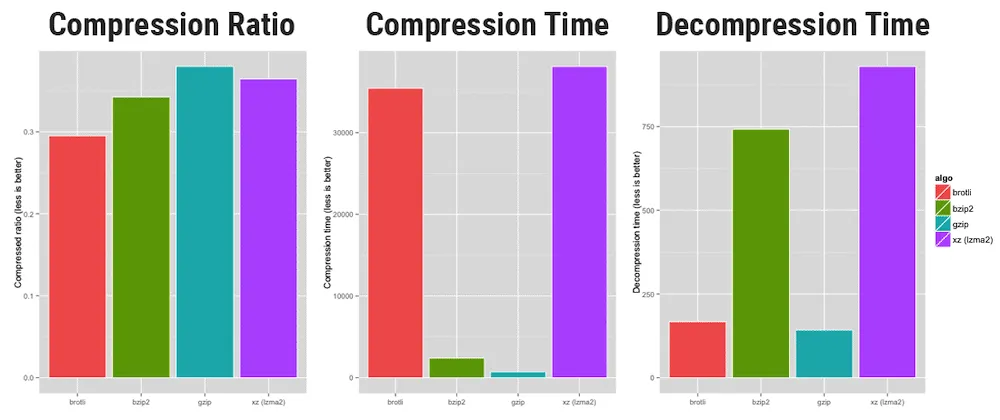
Credits to https://www.opencpu.org/posts/brotli-benchmarks/
3. Interactive Comparison
Explore the four scenarios across payload sizes. Move the records slider to 1 to see Gzip’s overhead on tiny payloads. Use the repetition slider to control how repetitive the string fields are — watch what it does to the Gzip bars (Protobuf is barely affected).
savings relative to plain JSON
Inspect sample data
X axis: record count (log scale) · Live-computed in your browser
4. Key Insights
A few patterns emerge from the data:
- Gzip alone beats plain Protobuf — at around 1-2 KB, JSON + Gzip is already smaller than uncompressed Protobuf. Enable Gzip before considering a serialization switch.
- Skip compression for tiny payloads — below ~500 B, Gzip’s fixed header makes the output larger than the input. Send plain JSON.
- Data entropy matters more than format — with incompressible data (unique strings, tokens, UUIDs), JSON + Gzip can actually beat Proto + Gzip: JSON’s repeated field names are the most compressible part of the payload, and Gzip eliminates them. With repetitive data, both formats compress well and the gap narrows further. Protobuf’s structural advantage is constant; Gzip’s benefit varies with your data.
5. Download Time
Payload size is only half the picture. What matters end-to-end is total transfer time: network latency plus serialization overhead. Select a bandwidth to see how the four formats compare across payload sizes.
X axis: JSON payload size (log scale) · Processing: serialize + compress + decompress + deserialize measured in your browser
6. When To Use What
| Scenario | Recommendation |
|---|---|
| Public REST API | JSON + Gzip. Developer experience matters; Protobuf’s tooling friction alienates integrators. |
| Internal microservices | JSON + Gzip is fine at first. Add Protobuf only after profiling shows bandwidth as the bottleneck. |
| Tiny payloads (<500 B) | JSON, no compression. Gzip overhead exceeds benefit. |
| Bulk data transfer (>500 KB) | Protobuf + Gzip. Binary encoding resists compression saturation. |
7. We cannot neglect: Schema Management
Switching to Protobuf have some operational commitment:
.protofiles must be versioned and shared across every service that communicates- Codegen must run in CI for every language in your stack (Go, TypeScript, Python, Java…)
- Schema evolution requires discipline: never reuse field numbers, deprecate carefully, handle unknown fields
- Debugging gets harder: you can’t
curlan endpoint and read the response in your terminal
For most APIs, the DX cost of this machinery exceeds the bandwidth savings you’ll ever see. A 30% payload reduction sounds impressive until you realize it’s saving $12/month on your CDN bill.
The real performance question isn’t “JSON vs Protobuf.” It’s “do I have a measured bandwidth problem?”
8. Conclusion
The data points to a clear, actionable hierarchy:
- Enable Gzip unconditionally. It’s one line of config and typically delivers 50-90% size reduction, depending on how repetitive your data is—more than switching serialization formats.
- Use JSON for anything public or developer-facing. The tooling story wins.
- Consider Protobuf for internal high-volume bulk endpoints where you’ve profiled bandwidth as a real cost, and your team has buy-in on schema management.
- Never compress payloads under ~500 B. You’re just adding overhead.
The next time someone says “we should use Protobuf for performance,” the right answer is: “Let’s enable Gzip first and measure. Then we’ll talk.”